
01Where you will see the code
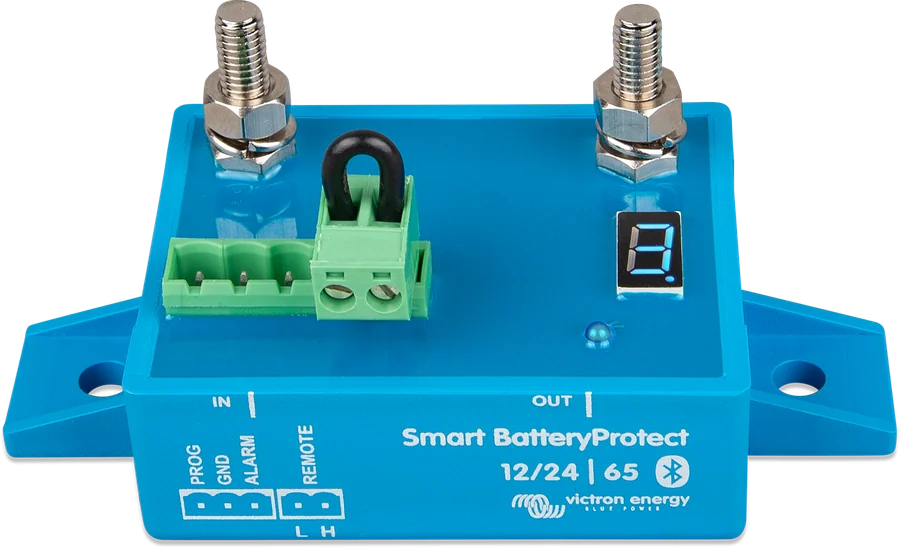
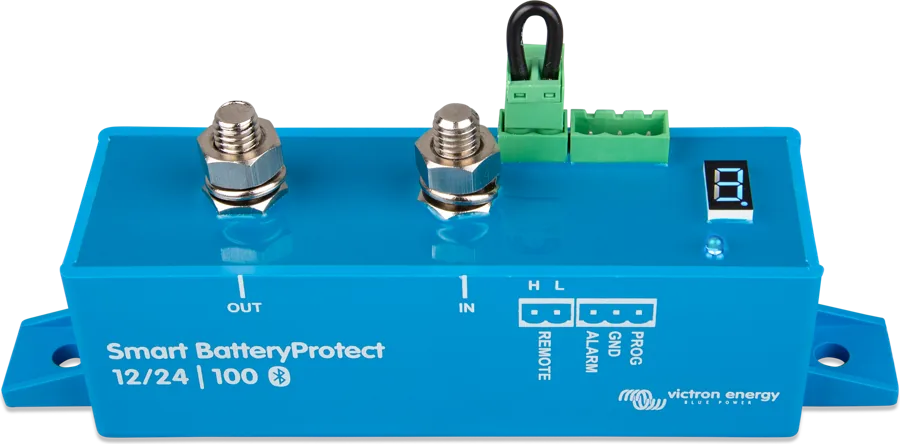
- Display and VictronConnect — the 7-segment display shows the error code (E0–E8) or warnings (P2, P3); the same codes are shown in the VictronConnect app on a phone or tablet with Bluetooth. After 5 minutes the code disappears from the display to reduce power consumption.
- E — error, P — warning: with P2 and P3, urgent action is needed before the SBP disconnects the loads.
- Decimal point on the display (status indicator): on — the SBP is trying to switch the output on; flashes every 5 seconds — the output is active; flashes every 2 seconds in Li-ion mode — the output is “connecting”.
- Operating modes: A — buzzer or LED (default), B — relay, C — Li-ion. In Li-ion mode, the undervoltage thresholds and the SBP alarm output are inactive: the loads are disconnected by the signal from the BMS on the Remote H terminal, and after each disconnection the SBP does not respond to a switch-on signal for 30 seconds.
- Versions: Smart BatteryProtect 12/24 V and 48 V have the same codes — only the E4 overvoltage threshold differs. The older BatteryProtect without Bluetooth shows codes only on the display; section 4.5 of its manual lists P2 and P3 alongside E2 and E3, but the appendix with code descriptions gives only E1–E4.
Under no circumstances should you connect inverters or inverter/chargers to the SBP through their DC inputs — reverse current may flow and damage the SBP. Control the inverter through its remote on/off port. Never use Smart BatteryProtect to charge a battery from a battery.
02Smart BatteryProtect
Calibration error
Internal fault — calibration data missing or corrupted.
What to do: contact your dealer. You cannot clear this fault yourself — the SBP must be replaced.
Originally: “Calibration failure” · Victron source
Short circuit
The short-circuit protection has tripped because of a short circuit, overload or excessive inrush current — for example when trying to power an inverter or inverter/charger directly.
After detecting a short circuit, the SBP tries to switch the loads on every 5 seconds; after two attempts it shows E1.
What to do:
- check that there is no short circuit in the circuit;
- make sure the current drawn by the loads does not exceed the SBP’s rated current;
- For loads with a high inrush current, switch them via their remote on/off input controlled by the SBP, rather than switching their DC supply on and off;
- check that the connections are not loose or high-resistance and that the cables have the correct cross-section.
Original: “Short circuit” · Victron source · short-circuit behaviour
Warning: overtemperature
Immediate action is needed to prevent the loads from disconnecting. The internal temperature is close to the limit — if it rises further, the overtemperature protection will trip (E2).
Original: “Over temperature warning” · Victron source
Overtemperature
The protection tripped because the internal temperature was too high.
What to do:
- make sure the current drawn by the loads does not exceed the SBP’s rated current;
- check that the connections are not loose or high-resistance and that the cables have the correct cross-section;
- do not install the SBP in a place exposed to high temperatures or radiant heat — move it to a cooler location or provide additional active cooling.
Original: “Over temperature” · Victron source
Warning: undervoltage
Immediate action is needed to prevent the loads from disconnecting. If you do nothing, the undervoltage protection will trip after 90 seconds.
In mode A (buzzer or LED), a continuous alarm starts after 12 seconds of undervoltage; in mode B (relay), the alarm relay energises after 12 seconds.
Original: “Under voltage warning” · Victron source · operating modes
Undervoltage
The protection tripped because the input voltage was below the selected undervoltage threshold for 90 seconds.
What to do:
- switch off or disconnect the loads and charge the battery;
- check that charging and the battery are working properly.
In mode A (buzzer or LED), the restart delay for the loads is 30 seconds. In Li-ion mode, the SBP undervoltage thresholds are inactive — the loads are disconnected by a signal from the BMS.
Original: “Under voltage” · Victron source · operating modes
Overvoltage
The protection tripped because the input voltage exceeded 16 V (12 V system) or 32 V (24 V system). In Smart BatteryProtect 48 V, the threshold is 64 V.
What to do:
- check the configuration of all charging devices in the system — especially the system voltage and charging voltages;
- check that charging is working properly;
- check that the system voltage in the SBP is set correctly.
In the event of overvoltage, the SBP disconnects the loads immediately. In mode A, the intermittent alarm lasts until the overvoltage is cleared, and there is no restart delay; in mode B, the alarm output remains inactive.
Original: “Over voltage” · Smart BatteryProtect 12/24 V · Smart BatteryProtect 48 V · operating modes
Configuration error
Internal fault — configuration data missing or corrupted.
How to restore the SBP to operation:
- restore factory settings in VictronConnect: Settings → More options → Reset to defaults;
- disconnect all power and wait 3 minutes before reconnecting;
- configure the device again.
Original: “Configuration failure” · Victron source
Reference voltage error
Internal fault — reference voltage missing or corrupted.
What to do: contact your dealer. You cannot clear this fault yourself — the SBP must be replaced.
Original: “Reference voltage failure” · Victron source
BMS lockout
The protection tripped because an external BMS told the SBP to disconnect and then reconnect the loads three times in a row — typically when the system shuts down because the cell voltage is too low.
After E7, the SBP remains off until the input voltage rises above 13 V (12 V system) or 26 V (24 V system) — according to section 4.4 of the manual for at least 30 seconds, which means the battery is being charged.
What to do:
- check the error codes or BMS log, determine the cause of the shutdown and fix it;
- switch off or disconnect the loads and charge the battery;
- check the wiring between the BMS and the SBP Remote terminal;
- check that the BMS is working properly.
The Smart BatteryProtect 48 V manual states the same thresholds for E7 (13 V and 26 V for 12 V and 24 V systems) — no threshold is given for 48 V.
Clears automaticallywhen the input voltage rises above 13 V (12 V system) or 26 V (24 V system).
Original: “BMS lockout” · Victron source · Li-ion mode · Smart BatteryProtect 48 V
Reverse current
The protection tripped because current flow in the reverse direction was detected.
Note: the SBP can only pass or block current from the IN terminal to OUT. Reverse current is strictly prohibited and can permanently damage the SBP. When the voltage on OUT is higher than on IN (Vout > Vin), uncontrolled reverse current flows through the SBP — therefore never use Smart BatteryProtect to charge a battery from a battery.
What to do:
- check the installation direction — current must flow from IN to OUT (see the example diagrams in the manual);
- make sure no charging source has been connected by mistake to the OUT terminal or circuit;
- if the SBP is disconnecting a charging source — make sure no loads have been connected by mistake to the IN terminal or circuit.
Original: “Reverse current” · Victron source
03BatteryProtect without Bluetooth
Short circuit
The short-circuit protection has tripped because of a short circuit, overload or excessive inrush current — for example when trying to power an inverter or inverter/charger directly.
What to do:
- check that there is no short circuit in the circuit;
- make sure the current drawn by the loads does not exceed the BP rated current;
- for loads with a high inrush current, switch them via their remote on/off input controlled by the BP, rather than switching their DC supply on and off;
- check that the connections are not loose or high-resistance and that the cables have the correct cross-section.
Original: “Short circuit” · Victron source
Overtemperature
The protection tripped because the internal temperature was too high.
What to do:
- make sure the current drawn by the loads does not exceed the BP rated current;
- check that the connections are not loose or high-resistance and that the cables have the correct cross-section;
- do not install the BP in a place exposed to high temperatures or radiant heat — move it to a cooler location or provide additional active cooling.
Original: “Over temperature” · Victron source
Undervoltage
The protection tripped because the input voltage was below the selected undervoltage threshold for 90 seconds.
What to do:
- switch off or disconnect the loads and charge the battery;
- check that charging and the battery are working properly.
Original: “Under voltage” · Victron source
Overvoltage
The protection tripped because the input voltage exceeded 16 V (12 V system) or 32 V (24 V system).
What to do:
- check the configuration of all charging devices in the system — especially the system voltage and charging voltages;
- check that charging is working properly;
- check that the system voltage in the BP is set correctly.
Original: “Over voltage” · Victron source
Devices this applies to
 Smart BatteryProtectDisconnects DC loads before the battery is discharged; in Li-ion mode controlled by the BMS.
 smallBMS NGSimple BMS for Lithium NG batteries without VE.Bus — controls chargers and loads via outputs, with Bluetooth.
 VE.Bus BMS V2BMS for Lithium Smart batteries in a system with MultiPlus or Quattro — controls the inverter, chargers and loads.
 VE.Bus BMS NGBMS for Lithium NG batteries in a system with MultiPlus or Quattro — Bluetooth, SoC on GX, discharge floor.
 Smart BMS 12/200BMS for 12.8 V Smart lithium batteries in vehicles and on boats — safely connects the alternator to the lithium battery and monitors each cell.
What next
Parameters, operating modes and connection diagrams — see the Smart BatteryProtect datasheet. For E1 and E2, check the cable cross-section: guide and cable and fuse calculator. Has the BMS shut down the system (E7)? See “BMS cut charging”. If the manufacturer indicates a hardware fault (E0, E6), contact the seller or installer from whom you bought the device.
Sources
- Smart BatteryProtect 12/24 V manual (65 A, 100 A, 220 A) — section 7.1 Error and Warning codes (HTML version, as of 21 September 2026)victronenergy.com · EN
- Smart BatteryProtect 12/24 V manual — section 4: operating modes, status indicator, short-circuit behaviour, fault modesvictronenergy.com · EN
- Smart BatteryProtect 12/24 V manual — section 3.2: warning when connecting invertersvictronenergy.com · EN
- Smart BatteryProtect 48 V manual — section 7.1 Error and Warning codesvictronenergy.com · EN
- BatteryProtect 12/24 V manual — section 6.1 Error and Warning codes and section 4.5victronenergy.com · EN